Building Gaming Space: The Importance of Power and Smart Energy
Introduction
A modern gaming setup is much more than a computer or console connected to a screen. For many people, it is a dedicated space for entertainment, online competition, content creation and communication. A well-equipped room might include a high-performance PC, multiple monitors, speakers, routers, lighting, cooling equipment and charging stations. Each component contributes to the experience, but they also create practical demands on the room’s electrical system.
As gaming technology becomes more advanced, the way people design and manage their gaming spaces deserves greater attention. Reliable power, effective cooling, sensible equipment placement and efficient energy use can all make a difference. These considerations are especially important for people who spend several hours gaming, stream content or use the same room as a home office.
Why a Gaming Setup Needs More Than Powerful Hardware
When planning a gaming room, most people begin by choosing the equipment. They compare processors, graphics cards, refresh rates, storage capacity and accessories. While these decisions are important, the surrounding environment can influence how comfortably and reliably the equipment operates.
A powerful desktop computer may consume considerably more electricity than a basic office machine. Add two monitors, a sound system, networking equipment and other accessories, and the total demand increases. A gaming room may also contain lighting, fans or an air conditioner that runs for extended periods.
This makes it useful to think about the complete setup rather than evaluating each device separately.
Before adding new equipment, consider:
- How many devices will operate at the same time?
- Which components need to remain powered continuously?
- Does the room have enough suitable electrical outlets?
- Is the existing electrical installation in good condition?
- Can heat from computers and monitors be managed effectively?
- Would improved lighting or cooling make the space more comfortable?
Answering these questions can help prevent an otherwise impressive gaming setup from becoming inconvenient to use.
See also: Understanding the End-to-End Mobile App Development Lifecycle
Electrical Reliability Is Part of the Gaming Experience
Few things are more frustrating than losing power during an online match, a live stream or a large file transfer. An unexpected interruption can disconnect players, interrupt downloads and potentially affect work being completed on the same computer.
For this reason, power reliability should be considered when arranging a gaming room.
One simple improvement is to avoid relying on overloaded power boards or a collection of extension leads. A room containing several high-demand devices needs an electrical arrangement that is appropriate for the connected equipment. The number of available outlets is not the only consideration; circuit capacity, wiring condition and electrical protection also matter.
Surge protection may help protect compatible equipment from certain voltage disturbances, but it should not be confused with a complete solution to every electrical problem. Likewise, an uninterruptible power supply (UPS) can provide temporary battery power for selected devices, allowing a user to save work or shut down equipment safely. Its capacity must be matched to the connected load and the required backup duration.
If a room needs additional outlets, circuit changes or other electrical improvements, the work should be assessed by a qualified professional. A local electrician atherton can help property owners consider the electrical requirements of a home setup and identify suitable improvements.
Managing Heat in a Room Full of Technology
Gaming hardware generates heat. High-performance processors and graphics cards can produce substantial amounts of it, particularly when running demanding games or rendering video. Monitors, consoles, routers and other electronics add to the overall heat load.
If a room has poor ventilation, temperatures can become uncomfortable. The computer may also have to work harder to maintain suitable operating temperatures, depending on its cooling design and the surrounding conditions.
Good room planning can help.
Start by leaving adequate space around the computer case and avoiding arrangements that block air intake or exhaust vents. Keep equipment away from direct heat sources where practical, and avoid placing a desktop inside a closed cabinet without suitable ventilation.
Room cooling is another important factor. Fans can improve air movement, while an appropriately selected air-conditioning system may be more effective when a room regularly becomes warm. Curtains or blinds can also reduce direct sunlight entering through windows.
It is worth remembering that cooling equipment consumes electricity too. Running an air conditioner continuously without considering room conditions can increase energy costs. A balanced approach combines suitable cooling capacity, sensible temperature settings and good ventilation.
Lighting Can Improve Comfort and Atmosphere
Lighting is often treated as a decorative part of a gaming room, especially when RGB strips and illuminated accessories are involved. However, the main lighting arrangement can affect how comfortable the space feels during longer sessions.
A room that is too dark may create an uncomfortable contrast between a bright display and the surrounding environment. On the other hand, poorly positioned lights can reflect from a monitor and make the screen harder to see.
A more considered arrangement can include soft ambient lighting, adjustable desk lighting and task lighting for reading or working away from the screen.
LED lighting is a popular option because it offers different colour temperatures and brightness levels. Smart lighting products can also allow users to adjust settings through an application or scheduled routine.
The aim should be to create an environment that supports the activity taking place. A person playing games may prefer a different atmosphere from someone editing videos, attending online meetings or studying at the same desk.
Understanding How Much Electricity Your Setup Uses
Many gamers know how much their computer cost, but have little idea how much electricity it consumes over a typical month.
Actual usage depends on the equipment, workload and time spent operating it. A computer running a demanding game will generally use more power than the same machine sitting idle. Monitors, speakers, consoles and cooling equipment add to the total.
A basic way to estimate consumption is to multiply the equipment’s power use in kilowatts by the number of operating hours.
For example, a device averaging 0.5 kilowatts and running for four hours uses approximately:
0.5 kW × 4 hours = 2 kWh
This is an illustrative calculation rather than a measurement of every gaming computer. Real consumption changes according to hardware and activity.
For a more accurate picture, suitable energy-monitoring equipment can provide information about electricity use. Some devices measure individual appliances, while more advanced systems can show broader household consumption patterns.
Monitoring can be useful when someone wants to understand whether a gaming setup is a major contributor to electricity costs or whether other household appliances are responsible for more of the total.
Smart Energy Monitoring Makes Usage Easier to Understand
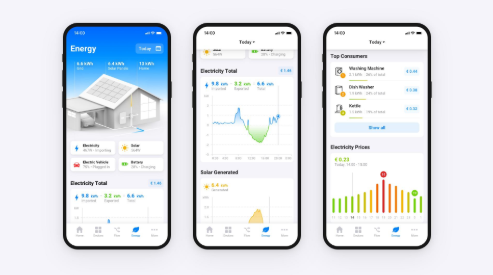
Smart technology has made it easier to access information about electricity generation and consumption. Instead of relying only on a monthly bill, property owners may be able to view more detailed data through a monitoring platform.
For homes with solar installations, a suitable solar panel monitor can help show how much electricity the system generates and how that energy is being used or stored. Depending on the equipment, users may also be able to review battery charging, household consumption and electricity exported to the grid.
This information can help people make better decisions about when to operate certain appliances.
For example, someone who works from home and games in the evening may be able to run some household equipment during daylight hours when solar generation is available. A family might schedule a washing machine or dishwasher to operate during a period of stronger solar production, depending on convenience and system performance.
Energy monitoring is not limited to gaming rooms. It can help property owners understand broader consumption patterns and identify opportunities to use electricity more efficiently.
Solar Energy and the Home Technology Environment
Solar power can be an interesting option for households with significant daytime electricity use. A property that supports remote work, content creation and gaming may operate computers and other equipment for many hours.
Solar panels can generate electricity during daylight hours, helping meet some of this demand. The amount of benefit depends on system size, sunlight conditions, roof orientation, shading and the property’s consumption pattern.
A solar system should be designed around the actual electricity requirements of the building. Simply choosing a larger system does not automatically make it the most suitable or economical option.
Battery storage can add another level of flexibility. Electricity generated during the day can be stored and used later, including during evening hours when many people use their gaming equipment.
However, a battery does not automatically guarantee that every device will continue operating during a blackout. Backup capability depends on the system design, inverter configuration, selected circuits and available stored energy. Anyone who wants gaming equipment, internet devices or other appliances to remain powered during an outage should discuss those specific requirements before installation.
Planning for Internet Equipment and Connected Devices
A modern gaming room often depends on more than the computer itself. Routers, network switches, Wi-Fi access points, consoles and smart-home devices may all contribute to the setup.
For online gaming, a stable internet connection can be just as important as powerful hardware. Network equipment should therefore be positioned sensibly, with suitable ventilation and reliable power.
Some users may choose to place their router and networking equipment on a UPS so that the connection remains available during a short interruption. The runtime will depend on the battery capacity and the devices connected to it.
Cable management also deserves attention. Keeping power and data cables organised makes the room easier to clean and reduces the likelihood of accidental disconnections. It can also help prevent cables from becoming tangled around chairs, desks or moving equipment.
As a setup grows, it is useful to review the arrangement rather than continually adding devices without considering the overall electrical and network layout.
Designing a Gaming Room That Can Adapt
Technology changes quickly. A setup that works well today may look different after a new graphics card, additional monitor or upgraded cooling system is introduced.
A flexible room design can make future improvements easier. A desk with enough space, suitable cable routes, accessible outlets and room for ventilation gives users more options when equipment changes.
Electrical planning should also consider other activities. Many people use one room for gaming, studying, remote work and content creation. Each activity may involve different equipment and different operating schedules.
A room designed around flexibility is more likely to remain useful as technology and personal requirements evolve.
Simple Habits That Can Reduce Unnecessary Energy Use
Improving efficiency does not always require buying new equipment. Everyday habits can also make a difference.
Consider these practical steps:
Switch off equipment when it is not needed. Computers, monitors and accessories do not need to remain fully powered throughout the day if they are not being used.
Use sleep settings sensibly. Automatic sleep modes can reduce consumption when a computer is inactive, although settings should be adjusted to avoid interrupting important downloads or tasks.
Review display brightness. Monitors do not always need to operate at maximum brightness, particularly in a room with controlled lighting.
Avoid unnecessary background activity. Applications and connected accessories that are not being used may still consume electricity.
Maintain cooling equipment. Clean filters and unobstructed airflow can help fans and air-conditioning systems operate as intended.
Review energy data. Monitoring consumption over time can reveal patterns and help identify practical improvements.
These measures may seem small individually, but they contribute to a more considered approach to electricity use.
Conclusion: A Better Gaming Setup Starts With Better Planning
A great gaming experience depends on more than fast hardware and attractive accessories. The room itself needs to support the equipment through reliable electricity, suitable cooling, comfortable lighting and sensible energy management.
Planning these elements together can make a gaming space more convenient and adaptable. It can also help property owners understand their electricity requirements before investing in additional equipment.
Solar generation, battery storage and energy monitoring may offer further opportunities for households that want to manage electricity more effectively. The right combination depends on the property’s usage, existing electrical infrastructure and future plans.
Ultimately, a well-designed gaming room should allow technology to perform without creating unnecessary problems elsewhere in the home. By giving power, comfort and efficiency the same attention as hardware specifications, users can build a setup that is ready for both today’s games and tomorrow’s technology.
Frequently Asked Questions
Does a gaming PC use a lot of electricity?
Consumption varies according to the processor, graphics card, power supply, monitor and workload. A high-performance computer running demanding games generally uses more electricity than a basic office PC. Measuring actual usage provides a more accurate estimate.
Can a UPS protect a gaming computer during a power cut?
A suitably sized UPS can provide temporary backup power for selected equipment. It gives users time to save work and shut down safely, but its runtime depends on battery capacity and the connected load.
Is solar power suitable for homes with gaming setups?
It can be. Solar generation may help meet daytime electricity demand from computers and other household equipment. Suitability depends on the property’s energy consumption, available installation area and solar conditions.
Does a solar battery keep a gaming PC running during a blackout?
Only if the installed system has suitable backup functionality and the relevant circuits are configured to receive backup power. Battery storage alone does not guarantee uninterrupted supply.
Why is cooling important in a gaming room?
Computers and other electronic devices produce heat. Proper ventilation and suitable room cooling help maintain a comfortable environment and support the equipment’s intended operating conditions.
How can I monitor the electricity used by my gaming setup?
A suitable plug-in energy meter or compatible monitoring system can provide information about consumption. Whole-home monitoring may also help identify how the gaming room fits into the property’s overall electricity use.
Should I upgrade the electrical outlets in my gaming room?
That depends on the existing installation and the number and type of devices being used. If outlets are insufficient, damaged or overloaded, a qualified electrician should assess the situation and recommend appropriate work.